Feedback Loop
A customizable feedback collection widget that allows you to gather user insights through categorized feedback options, helping you understand what your customers need and improve your product continuously.
You Can Fully Customize:
Creating a Feedback Loop Widget
To create a Feedback Loop widget:
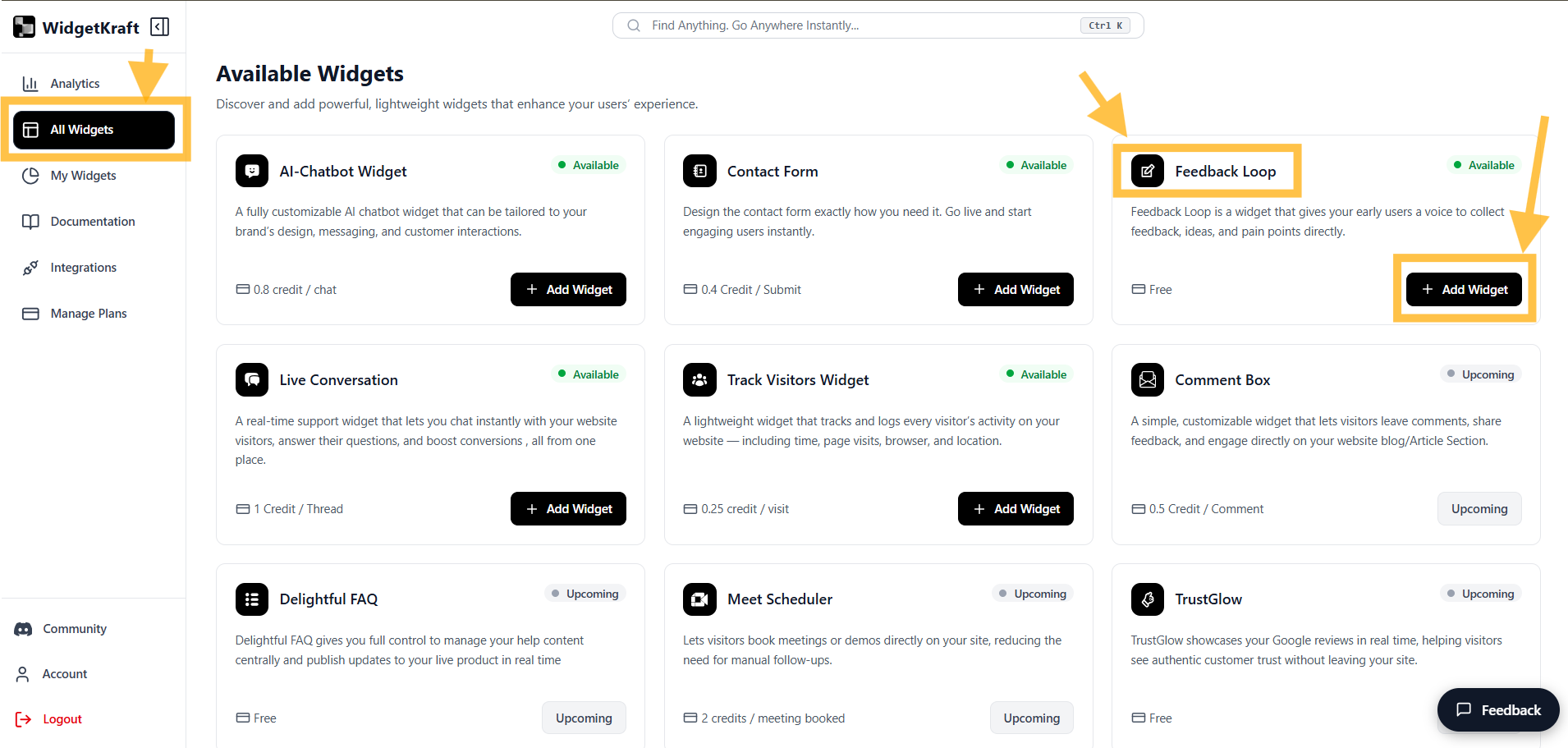
- 1Go to Available Widgets β Feedback Loop Widget
- 2Click Add Widget
- 3Go to My Widgets β Find Feedback Loop
- 4Click Configure & start customizing your widget

Navigate to widgets section and select Feedback Loop Widget
Understanding the Feedback Loop Editor
The editor is divided into four main configuration tabs:
Header
Title, subtitle and branding
Input
Message input configuration
Appearance
Widget size and visual design
Code
Embed snippet
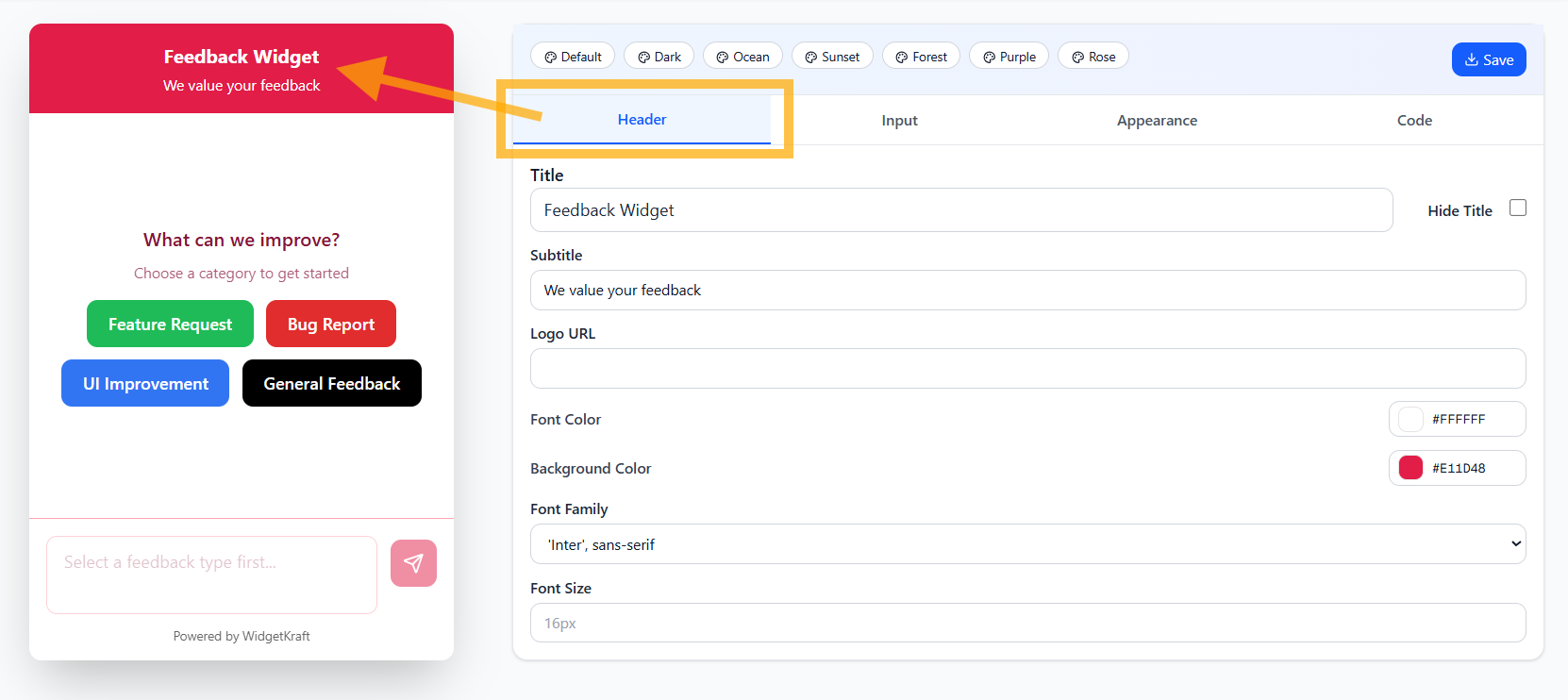
1. Header Tab
Controls the top section of your Feedback Loop widget including branding and messaging.
Configurable Elements
Title
Main heading displayed at the top of the widget
Subtitle
Supporting text below the title
Logo URL
URL to your company logo or brand image
Font Color
Color for header text
#FFFFFFBackground Color
Header background color
#E11D48Font Family
Choose the typeface for header text
Font Size
Size of header text

Example: Feedback Loop header with custom title, subtitle, and color scheme
2. Input Tab
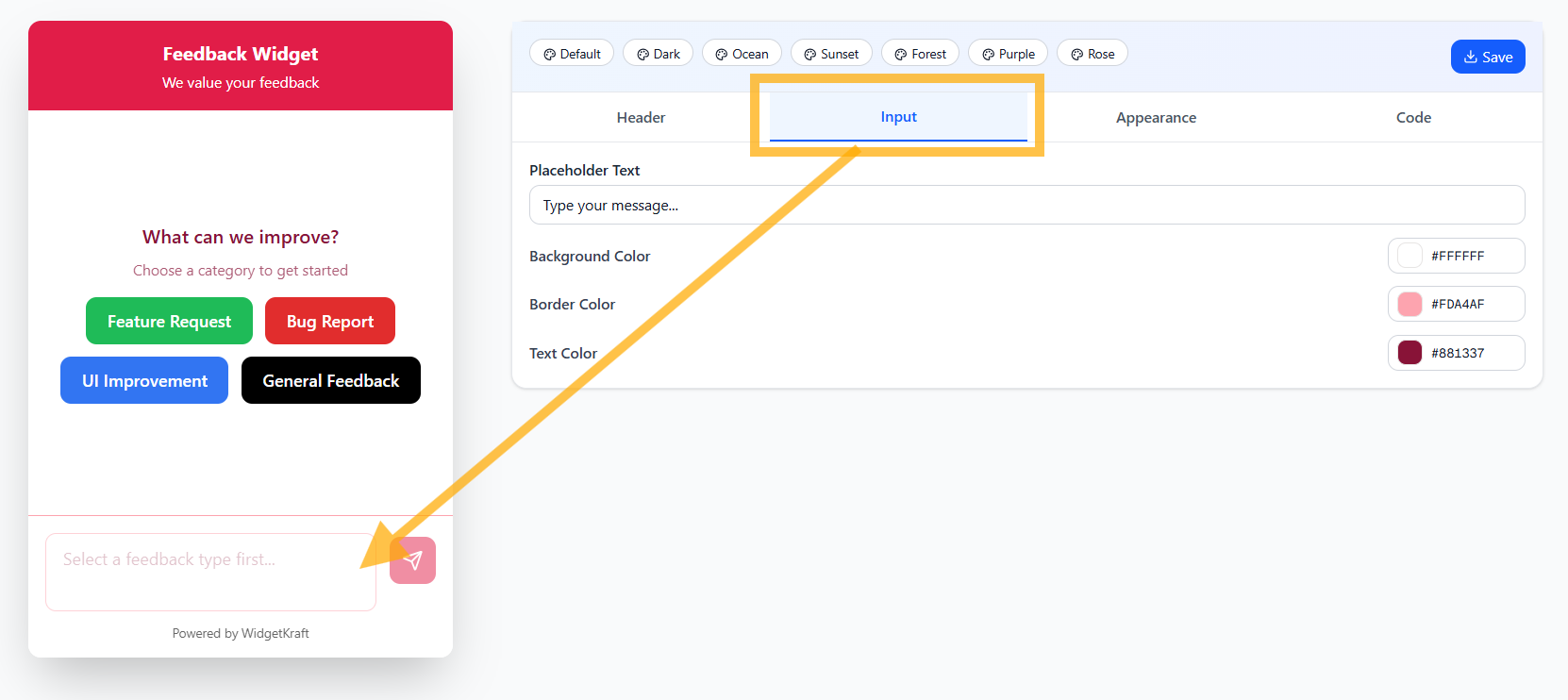
Configure the message input area where users type their feedback.
Input Field Settings
Placeholder Text
Hint text shown in empty input field
Background Color
Input field background color
#FFFFFFBorder Color
Color of input field border
#FDA4AFText Color
Color of text as user types
#881337
Example: Styled input field with custom colors and placeholder text
3. Appearance Tab
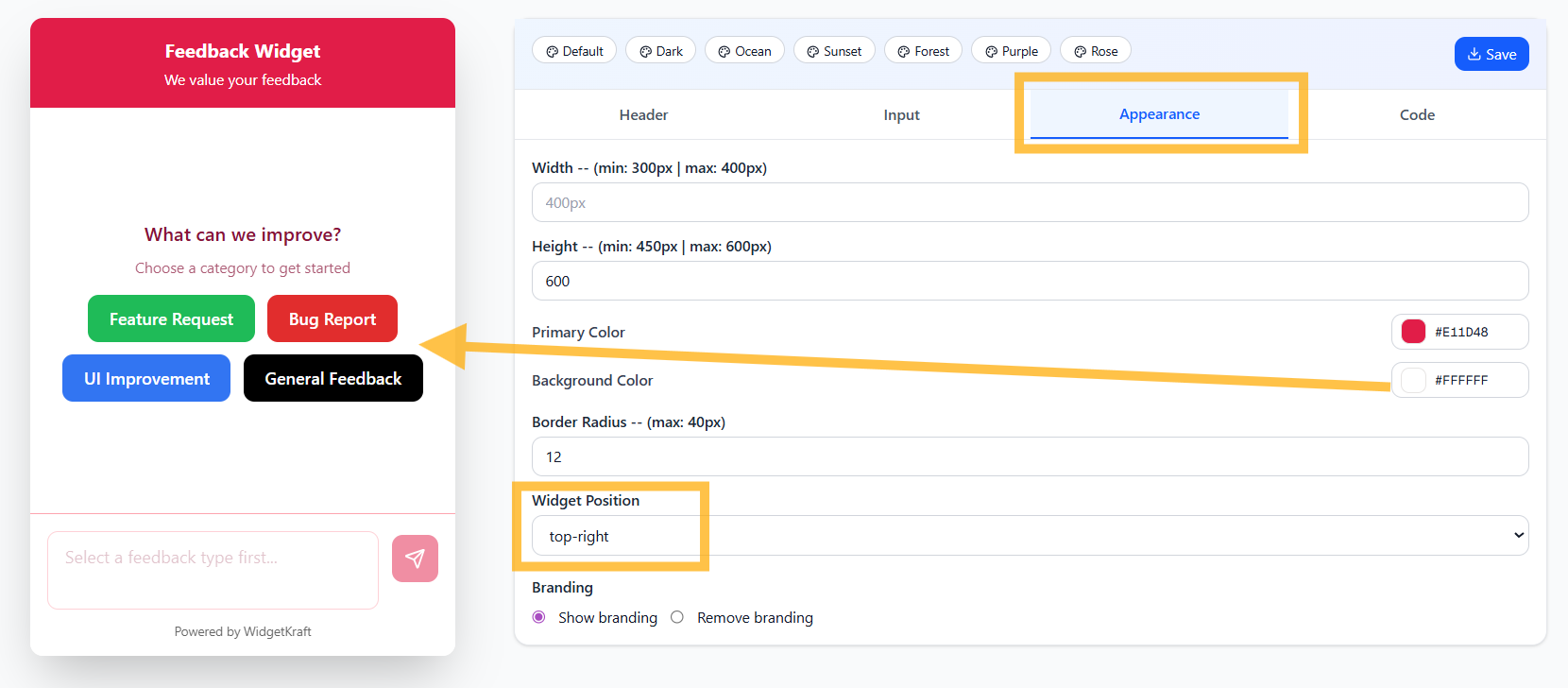
Control the overall widget dimensions, positioning, and visual style.
Widget Dimensions
Width
Control how wide the feedback widget appears
Height
Set the vertical size of feedback widget
Visual Styling
Primary Color
Main accent color for buttons and highlights
#E11D48Background Color
Main widget area background color
#FFFFFFBorder Radius
Roundness of widget corners
Widget Position
Choose where the widget appears on your page
Branding
Choose whether to display "Powered by WidgetKraft"
Theme Presets
Quick-start with pre-designed themes:
Click any preset to instantly apply coordinated colors across all elements

Example: Complete widget with custom dimensions, positioning, and styling
4. Code (Embedding the Feedback Loop)
Once your Feedback Loop is configured, get the embed code to add it to your website.
Embed Code Section
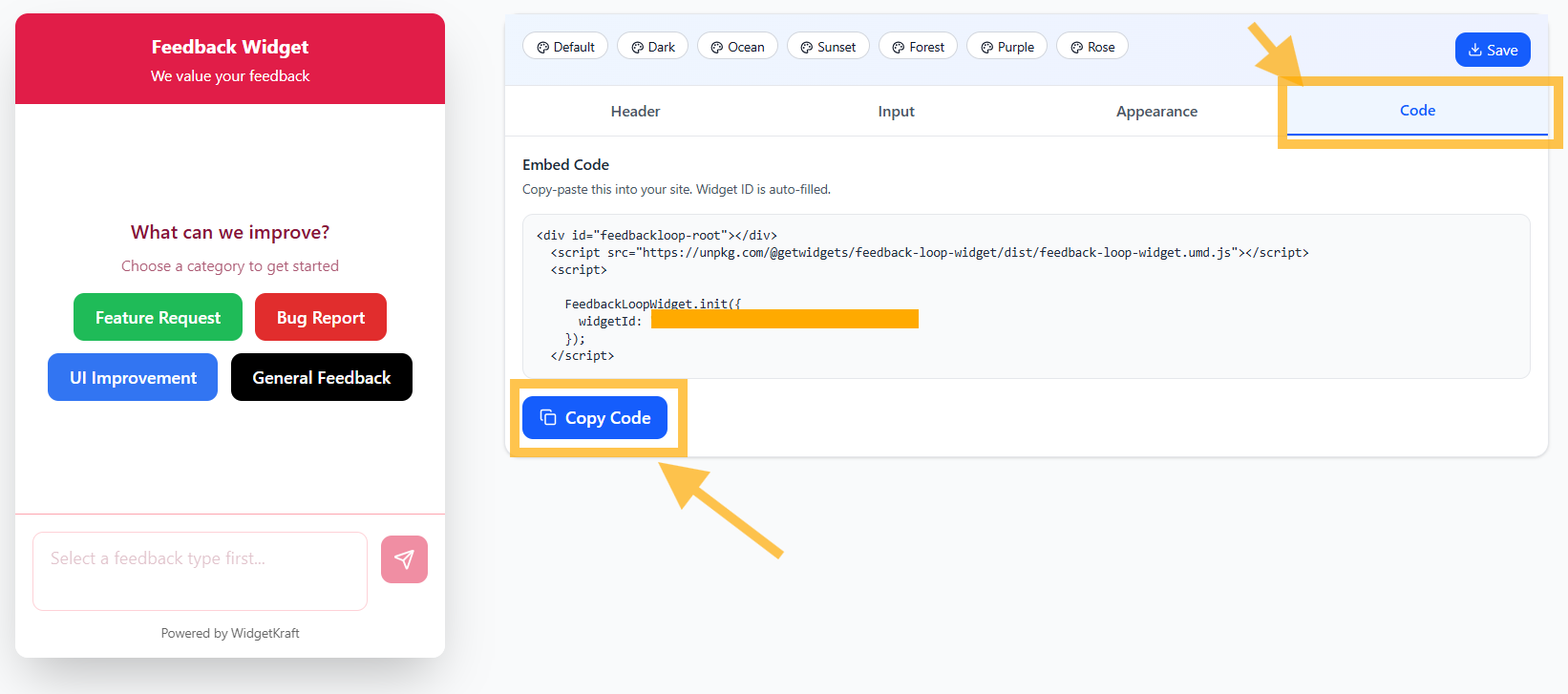
Copy and paste this ready-to-use embed snippet that includes your widget ID:
<div id="feedbackloop-root"></div>
<script src="https://unpkg.com/@getwidgets/feedback-loop-widget/dist/feedback-loop-widget.umd.js"></script>
<script>
FeedbackLoopWidget.init({
widgetId: "caaaaaaa-bbbb-4444-bbbb-d55555aerftd"
});
</script>How to Use the Embed Code
- 1Click Copy Code to copy the embed snippet
- 2Paste it into your website's HTML, typically before the closing
</body>tagThis ensures the Feedback Loop loads on every page of your site
- 3The Feedback Widget will appear based on your configured position (top-right, bottom-right, etc.)
- 4Visitors can select a feedback category and submit their thoughts instantly

Code tab showing the embed snippet ready to copy
Feedback Categories
The widget includes pre-configured feedback categories that help users quickly identify the type of feedback they want to provide:
Feature Request
Users can suggest new features or improvements they'd like to see
Bug Report
Report technical issues or problems with your product
UI Improvement
Suggestions for better user interface and user experience
General Feedback
Any other thoughts, comments, or feedback
Admin Dashboard & Analytics
Monitor and manage all feedback submissions from your centralized dashboard.
Dashboard Overview
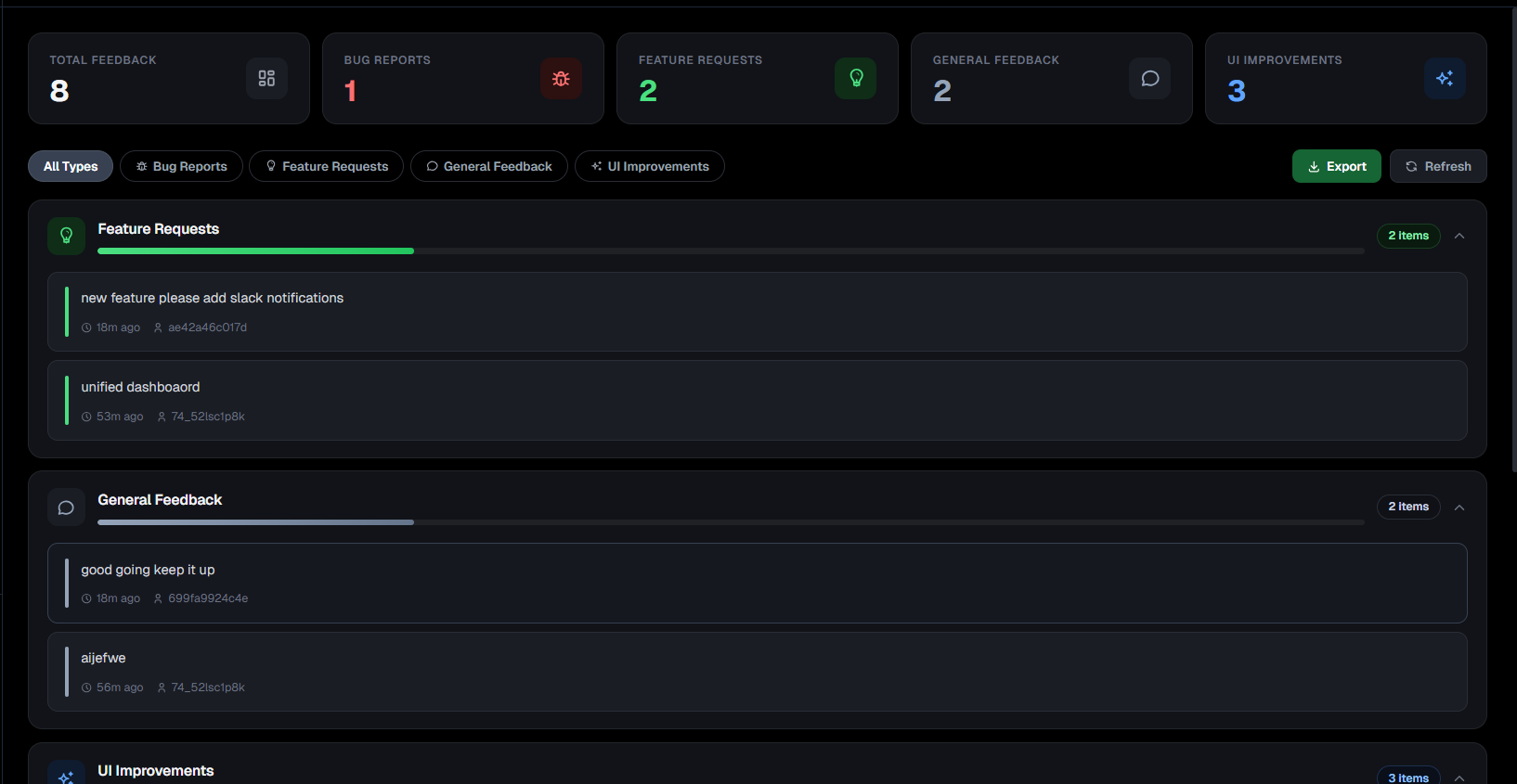
The Feedback Loop dashboard provides a comprehensive view of all user feedback, organized by category with real-time analytics.
Key Metrics at a Glance
TOTAL FEEDBACK
8
All submissions
BUG REPORTS
1
Technical issues
FEATURE REQUESTS
2
New ideas
GENERAL FEEDBACK
1
Other comments
UI IMPROVEMENTS
3
Design suggestions
Filtering & Organization
Quickly filter feedback by category to focus on specific types of submissions:
Feedback Items Display
Each feedback submission is displayed with key information for easy review:
Feature Requests
2 items"new feature please add slack notifications"
"unified dashboard"
General Feedback
1 items"good going keep it up"
UI Improvements
3 itemsView all UI improvement suggestions...
Dashboard Features
- Real-time updates: Dashboard refreshes automatically when new feedback arrives
- Category-based filtering: View feedback by type (Bug Reports, Feature Requests, etc.)
- Timestamp tracking: See exactly when each feedback was submitted
- Unique IDs: Each submission has a unique identifier for tracking and reference
- Export functionality: Download all feedback data for external analysis
- Progress indicators: Visual bars show the distribution of feedback types

Admin dashboard showing feedback categorization, metrics, and individual submissions
Pro Tip: Actionable Insights
Use the dashboard's filtering capabilities to identify trends. For example, if you see a spike in "UI Improvements" feedback, it might be time to review your interface design. Group similar feature requests together to prioritize your product roadmap effectively.
Integration & Technical Notes
- Lightweight integration: Single script tag with minimal performance impact
- Categorized feedback: Pre-defined categories help organize user input effectively
- Instant submission: Feedback is captured and stored immediately upon submission
- Mobile responsive: Works seamlessly on all devices and screen sizes
- Dashboard analytics: View and manage all feedback from your admin panel
- Powered by WidgetKraft: Professional support and reliable infrastructure
Summary
The Feedback Loop Widget allows you to:
Empower your users to share their voice β The Feedback Loop Widget makes it easy for customers to tell you what they love, what needs improvement, and what features they want next, helping you build a better product.