My Tools
Manage and monitor your active tools from one central view.
What this section is for
A single place to review deployed tools.
What you can do here
- View active tools and their current status
- Check IDs, types, and quick performance context
- Open Configure to update behavior or appearance
- Open View Dashboard for tool-specific analytics
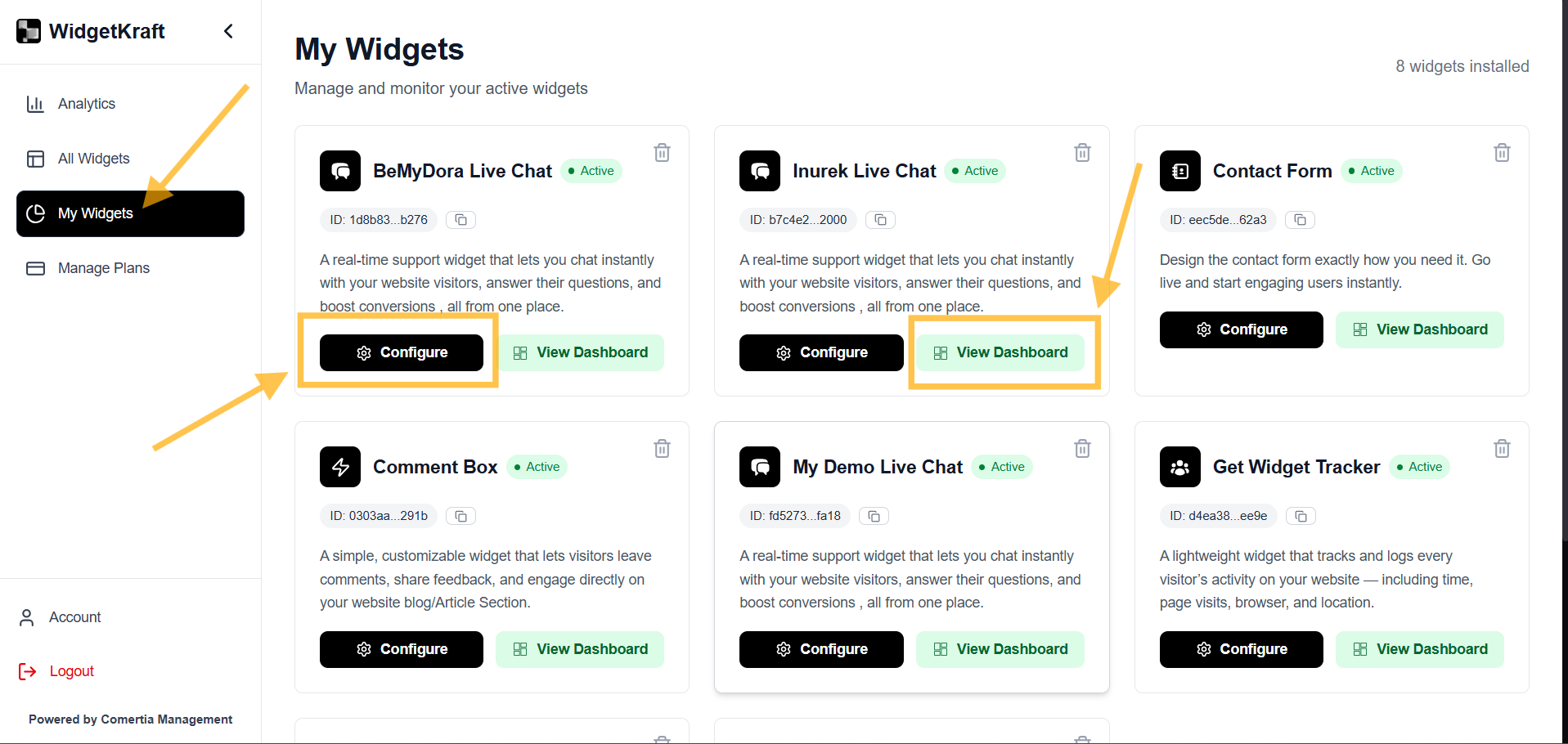
Overview of the My Tools screen
The main management view for deployed tool instances.
Why this matters
Each tool instance can serve a different page, audience, or workflow, so this screen helps you keep those deployments organized without jumping between separate dashboards.What information is shown
The most useful details are visible at a glance.
Tool identity
Name, current status, tool ID, and tool type.
Configuration access
Open Configure to adjust settings, text, visuals, or connected integrations.
Performance context
Review high-level engagement or activity before opening the detailed dashboard.
Multiple instances
Use separate tool instances for different pages, funnels, or customer journeys.
How to use this section
A simple workflow for managing deployed tools.
Recommended workflow
- 1Scan the list to see which tools are active
- 2Open Configure when you need to change behavior or appearance
- 3Use View Dashboard to inspect detailed analytics
- 4Compare different tool instances across pages or use cases
Summary
The My Tools section helps you:
See all deployed tools in one place
Review status, IDs, and tool types quickly
Open configuration for any tool instance
Jump into detailed dashboard views when needed
Monitor performance and engagement across tools
Manage multiple instances for different pages or use cases